

Listbox
Description
Drag a text field into a container and select the ‘Layout’ tab to enter the required text.
Several text formatting options are available (bold, italics, etc.).
Parameter
Table
This is used to select the table from which the listbox will retrieve the data.
Display type
Free height: the height of the listbox has no limit and displays everything it can.
Fixed height: the listbox height has a maximum limit, a scroll bar will appear to allow you to navigate between lines.
Pagination: the listbox has a fixed number of lines, a pagination will appear at the bottom right to allow you to navigate between the different lines (grouped by ‘page’).
Number of items loaded at each scroll
Number of items loaded into the listbox each time a user scrolls through the lines.
Number of lines to display
Number of items displayed at the same time in the listbox.
Minimum number of lines to display
Minimum number of items displayed at the same time in the listbox.
Background colour of the selected line
Used to define the background colour that the line will take on when selected.
Selected row text colour
Used to define the text colour that the line will take on when selected.
If necessary, specify the relationship path (e.g. Entity.MyRelationship)
Enables the field to be linked to an entity other than the module entity via a relationship.
First request or function to call for first request
Name of the first function/query executed to retrieve data from the listbox.
Function for custom sorting (e.g. ds.MATABLE.sortColumn)
Sorts the listbox lines according to the method passed in the parameter.
Table with the fields to be displayed
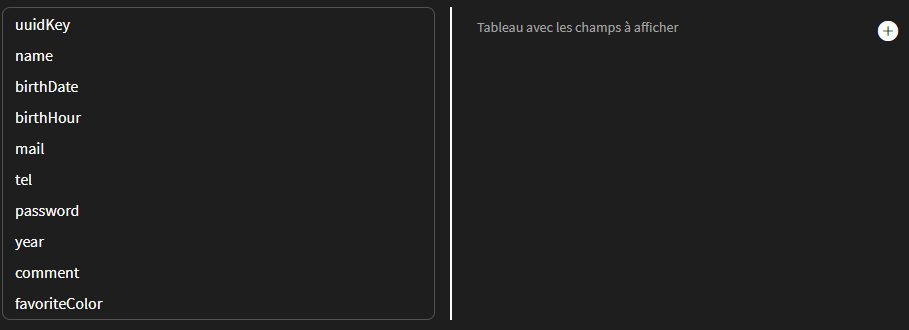
Requires ‘Table
Used to define which columns are visible in the listbox and which are not. To do this, simply drag and drop the property to be displayed onto the right-hand side.
Allow multiple selection
Allows the user to select several lines at the same time.
Display Headers
If checked, displays the column name at the top of the listbox columns.
Function to dynamically modify columns
Used to call a function to dynamically modify columns. Can be used, for example, to dynamically add new columns.
Switch to card below :
Sets the size at which the listbox should be displayed as a card.
Number of columns in card mode
Defines the number of columns the listbox should have when in card mode.
Number of rows in card mode
Defines the number of lines the listbox should have when in card mode.
Even line colour
Allows you to choose the background colour for even lines using a colour picker. Note that the first line of the listbox is line 0.
Odd line colour
Allows you to choose the background colour for odd lines using a colour picker. Note that the first line of the listbox is line 0.
Hover color
Selects the background colour of the line when the mouse hovers over it.
Text hover color
Selects the text colour of the line when the mouse hovers over it.